How not to mandate device-based age assurance
Software design by legal mandate
Posted 2026-03-29 by Eric Rescorla
Over the past several years, quite a few jurisdictions have started to require age assurance for access to various forms of content and experiences. In most current cases, this amounts to a mandate on the service (PornHub, Facebook, etc.), but understandably this isn't popular with services, who have in some cases been advocating to move requirements from the service to the device. A number of jurisdictions have recently passed legislation requiring device-based age assurance, including California AB 1043, Texas SB2420, and Utah SB 142. (see this report from the Knight-Georgetown Institute (KGI) by Zander Arnao, Alissa Cooper, and myself for the bigger picture on age assurance). While device-based age assurance can be made to work and has some technical advantages, actually writing requirements that don't undesirable side effects is a lot harder than it looks, as we'll be seeing in the remainder of this post.
Types of Device-Based Age Assurance #
Age assurance systems comprise two main technical components:
- Evaluating the user's age
- Enforcing that the user is only able to access content and experiences approved for their age.
To a great degree, these components are orthogonal: it doesn't how you established the user's age mostly doesn't really matter that much to how you enforce it. Broadly speaking, these there are a number of ways enforcement can work. In this post we'll be looking at systems where (mostly) the evaluation and enforcement happen on the user's device. As I said, most current age assurance systems do both evaluation and enforcement at the service level, so this is something new, and there's quite a bit of variation in the various ideas, in part because it's new and in part because I think there actually are a lot more options for how to do on-device enforcement.
At a high-level, there are three main ways to do device-based enforcement.
- Devices can attempt to filter out unwanted content on their own.
- Devices can refuse to install and/or run apps (programs) which are rated for an age range other than that of the user (or, on some cases, are approved by parents).
- Devices can provide an API that apps can use to determine the user's age range and then take appropriate action.
The first of these approaches doesn't really work well, for reasons we'll get into below. The second is obviously attractive because it takes all the load off of the apps, but it doesn't work well for apps which provide both restricted and unrestricted content and experiences. The obvious example of this type of app is a Web browser, which can browse porn sites but also totally unrestricted sites, but you could have a similar situation with an app like Facebook if there were restrictions on what content and experiences it could provide to minors. For example, the New York SAFE for Kids act, is a service-based age assurance requirement that restricts using algorithmic recommendation systems for children, but one could easily imagine this kind of restriction being levied at the device level. In these cases, enforcement has to happen in the app—or on the service it is the front-end for—because it's the app that knows whether a specific type of experience is restricted.
Enforcement by Apps #
The figure below shows the two main ways for app-level enforcement of the correct experience, namely in the app and on the service provider.
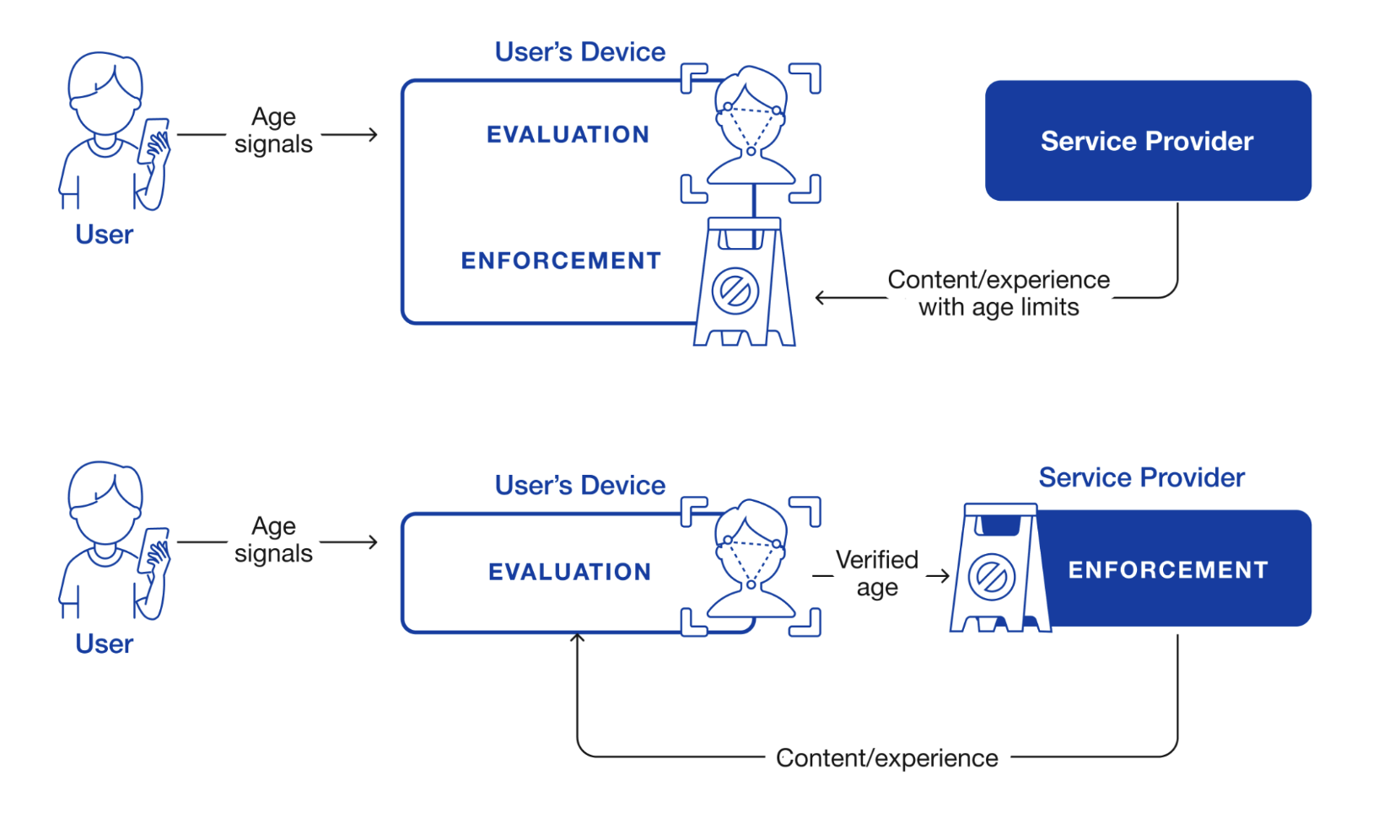
Device-based age assurance architecture. Source: Rescorla, Arnao, and Cooper 2026. Original figure by Kate Hudson.
The first option, in shown the top diagram, is that the service provider labels content and experiences with age ratings and let the app determine what experience to give the user. The second option, shown in the bottom diagram, is that the app sends the service provider the user's age—or more likely which age range they are in—and the service provider provides the correct experience. In the case of regular mobile apps where the service provider operates both the app and the server, (e.g., Facebook), the distinction between these two architectures is basically an internal implementation choice; the service provider can break up functionality any way it wants, just as with other functionality.
However, in the case of the Web, it does matter because the browser and the site are in general operated by different entities and so there needs to be some protocol they use to provide age enforcement, and so that needs to be written down. In principle, either architecture is possible, and each has pros and cons (see our report for more on this), but the most mature mechanism in this area is for the server to indicate "adult" content to the client using the Restricted To Adults label, which is already widely used by adult Web sites.
Types of Regulation #
With the help of Gemini Deep Research, I was able to identity the following possibly non-exhaustive list of legislation and proposed legislation[1] for device-based age assurance in the US.
| Jurisdiction | Status |
|---|---|
| United States Federal (H.R. 3149) | Proposed |
| Texas (SB 2420) | Enacted (Under Injunction) |
| Utah (SB 142) | Enacted |
| Utah (SB 104) | Enacted |
| Louisiana (HB 570) | Enacted |
| California (AB 1043) | Enacted |
| Alabama (HB 161) | Enacted |
| Alaska (HB 46) | Proposed |
| Kansas (SB 372) | Proposed |
| Florida (SB 1722) | Proposed (Died in committee) |
| Idaho (SB 1158) | Proposed (Died in Committee) |
| Illinois (SB 3977) | Proposed |
| Michigan (SB 284) | Proposed |
| New York (SB S8102A) | Proposed |
| South Carolina (H.4689) | Proposed |
| Colorado (SB 26-051) | Proposed |
There's a fair bit of overlap in these rules (its not uncommon for legislators to start with "model legislation" produced by some external party), but there are also a lot of variation, including:
-
Whether the user is required to demonstrate their age or whether the device just asks them for it.
-
Who the requirements are levied on (manufacturers, OS providers, app stores, etc.)
-
Whether app store downloads are restricted.
-
What developers are required to do if they learn that a user is a minor.
-
Whether restrictions apply to desktop or just mobile.
This also provides us with some good examples of how these regulations can be written in ways that are likely to be ineffective or problematic.
Device-Level Filtering #
Several of these mandates require that the device itself filter content. Here's Utah SB 104:
All devices activated in the state shall: (1) contain a filter; (2) ask the user to provide the user's age during activation and account set-up; (3) automatically enable the filter when the user is a minor based on the age provided by the user as described in Subsection (2); (4) allow a password to be established for the filter; (5) notify the user of the device when the filter blocks the device from accessing a website; and (6) allow a non-minor user who has a password the option to deactivate and re-activate the filter.
And here's South Carolina's H.4689 (not enacted):
(1) contain a filter; (2) determine the age of the user during activation and account set-up; (3) set the filter to "on" for minor users; (4) allow a password to be established for the filter; (5) notify the user of the device when the filter blocks the device from accessing a website; and (6) give the user with a password the opportunity to deactivate and reactivate the filter.
The general idea here is supposed to be that it applies to all uses of the platform, no matter what software the user using. It's understandable why one would want this, but the tricky bit is the definition of filter. Here's the definition from South Carolina:
(3) "Filter" means software installed on a device that is capable of preventing the device from accessing or displaying obscene material as defined by Section 16-15-305 through Internet browsers or search engines via mobile data networks, wired Internet networks, and wireless Internet networks.
Read literally this is a real problem because we don't actually know how to implement it. There are two main potential approaches to Internet filtering:
- Have a list of sites which are known or believe to host restricted material and which are filtered by the browser.
- Attempt to detect restricted content (e.g., via some AI nudity classifier) and refuse to show it.
Neither of these approaches is great. List-based systems are a common feature of existing parental control systems and of institutional controls systems (e.g., in schools). The available evidence is that they don't work very well, and have problems both with overblocking (blocking content that shouldn't be restricted) and underblocking (failing to block content that should be restricted). Obviously, what should and shouldn't be restricted is a bit of a judgement call, but this is inherently a hard problem.
Even if it were possible to accurately mechanically distinguish between "obscene" and "non-obscene" material, it's not really practical for a single piece of software to "prevent the device from accessing" that material. A computing device isn't a single monolithic thing but a collection of different pieces of software—including software written by other people than the device manufacturer and installed by the user—and it's not generically practical to prevent such software from displaying "obscene material" if that software doesn't want you to.
Instead, typical existing device-based filtering mechanisms work by restricting what network connections you can make. This is to some extent effective but increasingly less so as client software adopts technologies like DNS over HTTPS and Encrypted Client Hello that are designed to conceal activity from the network and also do so to some extent from the machine. This isn't to say it's not possible to supervise some of the behavior of software, but not well if they are trying to evade it. Therefore, the effectiveness of that supervision is going to be limited unless the operating system also restricts what you can install. If I were an operating system vendor, I would be quite concerned about my ability to comply with this provision.
The Utah text is better in this respect:
(3) "Filter" means generally accepted and commercially reasonable software used on a device that is capable of preventing the device from accessing or displaying obscene material through Internet browsers or search engines owned or controlled by the manufacturer in accordance with prevailing industry standards including blocking known websites linked to obscene content via mobile data networks, wired Internet networks, and wireless Internet networks.
As noted above, your options as an operating system vendor are a bit limited, but the "generally accepted and commercially reasonable" language suggests you probably don't need to do anything beyond the normal types of filtering. As I said, they're not great in terms of effectiveness, but that's not your problem as the OS vendor who just wants to be in compliance with the law. Moreover, the restriction to "Internet browsers or search engines owned or controlled by the manufacturer" means that you don't have to make third party software conform, which makes the job a lot easier.
On the other hand, this also means that it's not likely to be effective because users can just download software that bypasses the filtering.
Alternative Approaches #
I don't think this text can really be salvaged. It's just not that practical to require the device to be responsible for ensuring that users aren't able to view any contraband material. It's more practical to require that applications do some filtering, with the exception of Web browsers, which face many of the the same challenges in doing unilateral filtering of websites that devices have in constraining applications.
Including Open Source Operating Systems #
A number of these regulations require that the operating system vendor participate in age assurance. For example, here's the relevant text from CA AB 1043.
(f) “Covered manufacturer” means a person who is a manufacturer of a device, an operating system for a device, or a covered application store.
...
(a) A covered manufacturer shall do all of the following: (1) Provide an accessible interface for requiring account holders at account setup that requires an account holder to indicate the birth date, age, or both, of the user of that device for the sole purpose of providing a signal regarding the user’s age bracket to applications available in a covered application store.
The basic problem here is that the definition of "covered manufacturer" is very broad. It clearly covers all operating systems, including open source operating systems like Linux. What's less clear is who it applies to in those cases. For example, if you're a contributor on an Open Source project like Debian are you personally responsible for making sure your software does this stuff? Some developers, such as the MidnightBSD operating system and even the DB48X calculator software[2] have added restrictions forbidding use in California.
The Illinois language is even scarier in that it explicitly calls out individuals:
"Operating system provider" means a person or entity that develops, licenses, or controls the operating system software on a computer, mobile device, or any other general purpose computing device.
This article from LinuxTeck does a good job of covering the issues here and how various entities are responding to California AB 1043 and how the Open Source organizations failed to intervene before the law was passed, with the result that the text is concerningly overbroad.
Alternative Approaches #
This all seems pretty undesirable, but it's also somewhat tricky to figure out how where to draw the line. Plainly you don't want individual developers who work on iOS to somehow be responsible for whether Apple does age assurance, so for commercial operating systems, you could probably make clear that the requirement is on the vendor rather than on the user. The situation is a lot less clear for open source operating systems. In some cases, such as Debian, a Linux distro will be backed by some nonprofit, or in other cases, such as Ubuntu, by a company. In both of these cases one could imagine levying the restriction on that entity. The situation seems less clear for some other distros like Linux Mint.[3] Even then, you have to worry about whether those distros can effectively comply for versions of the operating system that have already shipped (see the next two sections).
Effectiveness Date #
Most of these mandates require the app store provider, OS provider, manufacturer, or app developer respectively to do things immediately effective on the effectiveness date of the mandate. This isn't necessarily a problem in cases where the user's interaction with the regulated entity is online, but that isn't always the case. For example, making an account with the iOS app store or the Google Play Ready store is an inherently interactive activity and so Apple or Google can enforce the new rules for new accounts or potentially for existing accounts when users choose to download a new app.
The situation is much less straightforward when the new requirements are implemented by software on the user's machine which therefore must be updated to take effect. Even on systems which auto-update, updates can take a very long time to roll out. For example, the figure below shows the fraction of Android versions over time.
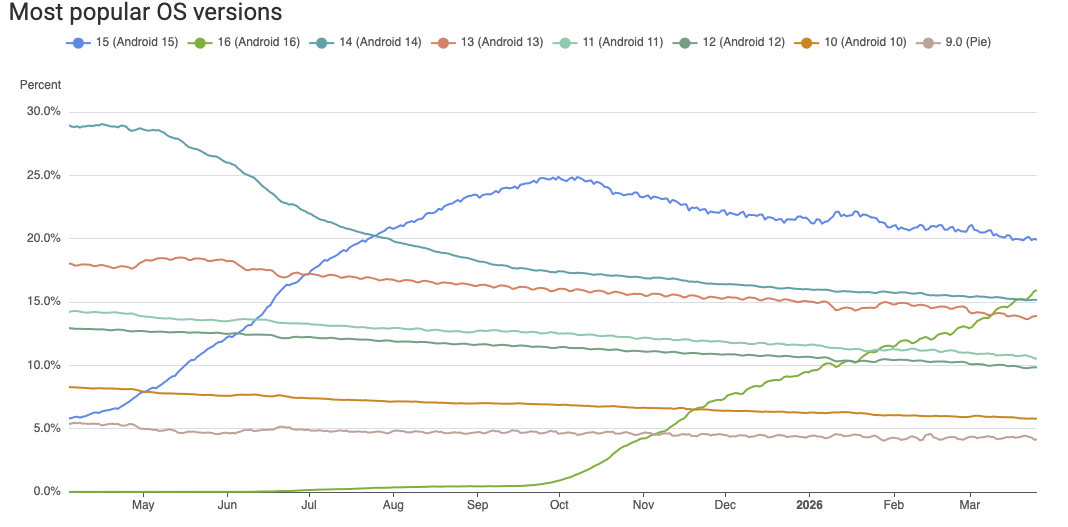
Android versions over time. Source AppBrain.
As you can see, Android 9.0 still has 4% market share, even though it was released in 2018 and hasn't received security updates since 2022. Collectively, over 40% of the Android ecosystem is on versions that aren't receiving security updates. In many cases, this is because users aren't updating or third party vendors aren't providing updated firmware. In any case, it's not clear how Google could as a practical matter make those devices implement new age range APIs. The situation is better on iOS, but there are still plenty of people who haven't update their iPhones and iPads.
Mobile devices phones are actually the best case scenario because (1) they were often designed with auto-update in mind and (2) people overwhelmingly get their apps through the app store. Many desktop apps don't have any kind of auto-update functionality, and so it's not clear how an app vendor would conform to requirements to implement new behavior.
Alternative Approaches #
This issue is actually comparatively easy to fix by simply requiring the new behavior on any substantial update (e.g., not just security fixes) to the system. This isn't quite as satisfying, but the most important devices from the perspective of managing minor's access are going to be getting regular updates or just eventually replaced, and so the end result will be good coverage in relatively short order.
Geographic Scope and Location Ambiguity #
For obvious reasons, the scope of these restrictions is typically limited to the jurisdiction requiring them. For instance, Utah's SB142 applies when "an individual who is located in the state" and California's AB1043 refers to an Account Holder, who is "an individual who is at least 18 years of age or a parent or legal guardian of a user who is under 18 years of age in the state." Implementing these mandates correctly obviously depends on knowing which jurisdiction this device is in. This is not always straightforward.
There are four main ways of determining a device's location:
- Via GPS or other satellite-based location systems (e.g., GLONASS, Galileo, etc.)
- By measuring the distance from in-range mobile phone towers.
- By looking at the local WiFi environment (e.g., which WiFi access points are in range).
- Via IP geolocation.
However, not all of these will always be available.
Typically, mobile devices will perform some sort of sensor fusion to estimate the location based on the available signals. For obvious reasons, mobile phones need to be able to see local mobile towers and most mobile phones now have GPS, so it's typically straightforward for the device operating system to determine where it is. By contrast, only some tablets have mobile connectivity and/or GPS chips, and ones that do not will have to fall back to the other two methods. This isn't necessarily a problem because WiFi-based geolocation can be quite accurate, depending on the WiFi environment. The situation is even worse on desktop. Most desktop devices don't have mobile connections or GPS at all, and so you're stuck with Wi-Fi and IP addressed based location.
Importantly, just because the device knows where it is that does not mean that apps know where they are. Because location information can be sensitive, modern operating systems require user permission before sharing the user's location with the app. Many apps do not need location for their current functions and for obvious reasons Google and Apple discourage asking for excessive permissions. As a result, only around half of apps have location permissions. Apps which do not have location permissions have two main choices:
- Ask for location permissions
- Use IP-based geolocation only.
Neither of these is great. From the user's perspective, having app unnecessarily ask for location isn't great for privacy, especially as the user has no way of knowing whether the app is exfiltrating the data. It's also not great from app's perspective because it makes users suspicious ("why does my calculator want my location?"), and in fact this kind of excessive permission ask is one of the signals that an app is doing some kind of suspicious user tracking.
IP-based geolocation doesn't require the user to provide permission because the app can observe the IP address itself without help from the operating system. The good news is that there are free IP location databases which can be downloaded and will get you resolution down to the city level. The bad news is that they are updated frequently, so you either need to run some kind of geolocation service or push the updated database to the client for resolution. Moreover, it's likely the user's device is behind a NAT. and doesn't know its own IP address so you have to use some external server to resolve the IP address. Note that this applies even to apps which otherwise wouldn't "phone home" at all, so now you're effectively tracking the location of users!
Alternative Approaches #
The bottom line here is that while the operating system generally will be able to determine where a device is with some level of resolution, the situation is much worse for apps, many of will have to ask for otherwise unnecessary permissions or do substantial extra work in order to get the user's location; either of these choices also comes at a potential increased risk to user privacy. As we suggest in our report, it would be a lot easier for apps if the age range APIs that these mandates already make the operating system offer also provided the jurisdiction at a coarse level (e.g., the state) so that the app could enforce the appropriate policy. Even so, it is likely that both the OS and the apps will occasionally get the answer wrong (consider the case of a device which must use IP geolocation and is located near a state border) and so these mandates probably should contain some text about "commercially reasonable" attempts to verify location.
Including Irrelevant Apps #
As noted above, quite a few of these mandates have a structure where the platform determines—or sometimes just collects—the user's age and then provides it to apps via an API, which developers are required to use. Unfortunately, in many cases all apps are required to request the user's age even if there's nothing meaningful for them to do with it. Here's some language from Utah SB 142:
(8) "Developer" means a person that owns or controls an app made available through an 73 app store in the state.
...
(1) A developer shall: (a) verify through the app store's data sharing methods: (i) the age category of users located in the state; and (ii) for a minor account, whether verifiable parental consent has been obtained; (b) notify app store providers of a significant change to the app; (c) use age category data received from an app store or any other entity only to: (i) enforce age-related restrictions and protections; (ii) ensure compliance with applicable laws and regulations; or
And here is New York S8102A:
- "COVERED DEVELOPER" SHALL MEAN A PERSON WHO OWNS OR CONTROLS A WEBSITE, ONLINE SERVICE, ONLINE APPLICATION, MOBILE APPLICATION, OR PORTION THEREOF THAT IS ACCESSED BY A USER IN THE STATE OF NEW YORK.
...
§ 1542. OBLIGATIONS FOR COVERED DEVELOPERS. 1. ALL COVERED DEVELOPERS SHALL REQUEST AN AGE CATEGORY SIGNAL FOR A USER FROM A COVERED MANUFACTURER WHEN SUCH USER DOWNLOADS AND LAUNCHES SUCH DEVELOPER'S WEBSITE, SERVICE, OR APPLICATION. 2. IF THE SIGNAL INDICATES THAT A USER IS A COVERED MINOR, THEN SUCH COVERED DEVELOPER SHALL TREAT SUCH SIGNAL AS AN AUTHORITATIVE INDICATOR OF SUCH USER'S AGE FOR THE PURPOSES OF COMPLIANCE WITH ANY APPLICABLE LAW AND THE COVERED DEVELOPER SHALL BE DEEMED TO HAVE ACTUAL KNOWLEDGE THAT A USER IS A COVERED MINOR ACROSS ALL PLATFORMS AND POINTS OF ACCESS S. 8102
We'll get to the "WEBSITE" part of this later, but notice that this means that if you offer any kind of app, even one which doesn't collect any user data and which doesn't have any kind of restricted content, you still are required to query the platform for the user's age. This goes for calculator apps, weather apps, etc. There are two obvious problems here, one from the perspective of the user and one from the perspective of the developer.
From the perspective of the user, this requirement creates unnecessary leakage of sensitive information—i.e., the user's age bracket—from the platform to the app. This is the kind of information that under normal circumstances that we would want platform to put behind a consent dialog, but in this case all apps are going to request it as a matter of course.
From the perspective of a developer, this means that everyone has to adjust their apps to request the user's age, even if they don't do anything with the information. For instance, if you're a calculator app, you don't need to know the user's age because the app doesn't behave any differently for children.[4] This is obviously a huge imposition on developers, who may not even be aware of these new regulations, which, of course, differ from jurisdiction to jurisdiction, and very likely many developers will unknowingly be in violation of these rules.
Many of these mandates are tied to app stores, or in some cases specifically to mobile devices, but for those that aren't, such as CA AB1043, the problem is much worse, for several reasons:
- There's no central app store backing you up.
- In principle the iOS and Android app stores could verify compliance or at least that apps call the APIs (though I don't know that they do).
- It's a lot less clear what a desktop application is.
- There are of course applications that people can download, such as Microsoft Word, but there's lots of software you can download that has some command line interface but isn't really an end-user app. For example, are the node.js[5] JavaScript runtime or the LaTeX typesetting systems required to query for your age?
There are a lot of open source apps with no real connection to the jurisdiction. Suppose that I write an app and put it up on GitHub. Am I now liable when some Linux distribution makes it available to their users, even if I had nothing to do with it at all at all?
Parental Monitoring Features #
Although some of these mandates mostly require that apps query for the user's age range and then have minimal requirements on what they do with it, a number require apps to provide parental control and monitoring features, even when those features are not really sensible for the app in question. For example, here is Alaska HB 46:
(c) A developer shall provide readily accessible features for a parent of a minor located in the state to implement time restrictions on using the developer's app, including allowing the parent to view metrics reflecting the amount of time the minor is using the app and setting daily time limits on the minor's use of the app.
So this means that if I make a calculator app, I need to build a whole system for implementing parental control metrics and daily time limits! Aside from this being a burden on developers, it also introduces a whole new set of privacy risks because it now requires developers to monitor usage on a per-user basis, store that usage information, and make it accessible to parents.
Even if we ignore whether it's a good idea for parents to be able to track and control the usage of every app on the user's device, this is a significant privacy regression in other ways, especially if it's not done carefully: for example if you just have the app phone home whenever it's used, then it becomes a tracking system because the developer gets to see the user's IP address and potentially use it to roughly geolocate them. It's also likely that many developers will just decide to use some third party SDK or even a third party service to provide this function, which creates its own privacy risks, both because it allows that entity to track the user and because many of those SDKs have bad security and privacy practices, whether intentionally or unintentionally.
Alternative Approaches #
The basic problem here is the requirement that every app query the user's age information without regard to the properties of the app and whether it will do anything with the information. An alternative here would be to require apps to request that information only if their behavior would change as a result.
For example, in the case of New York S8102A, the information is intended to be an "authoritative indicator" of the user's age that gives the developer "actual knowledge that the user is a covered minor", which is presumably intended to hook into other statutes such as the SAFE For Kids Act that have substantive requirements for how the app behaves (e.g., not showing behavioral ads). The statute could instead be written to require the apps to either:
- Conform to those substantive requirements for all users.
- Query for the user's age range and conform to those substantive requirements for minors.
You might need some legal cleverness to make this work with the existing laws that depend on "actual knowledge" of minor status, for instance by reading all those places as "actual knowledge or failure to query the platform where possible", but this seems like it's at least a potential alternative avenue.
Requiring Web Support #
Several of these proposals also place requirements on the Web. Recalling the New York text from above, a "covered developer", which includes a person who "owns or controls a website" is required to " request an age category signal for a user from a covered manufacturer when such user downloads and launches such developer's website, service, or application". You don't usually download a website, but you might launch one, and in this case the website would be required to request an age category signal.

There isn't any standard for what this signal would look like, but in the context of an operating system, we'd expect the OS to provide an API that the app would call. These APIs might differ between operating systems, but the developer has to do some work to port their app to a different operating system anyway, and that work could involve using the correct API.
In the context of the Web, we'd either expect a standardized header from the browser or a standardized Web API that the browser would implement, but neither of these exists, so it's not clear what the site is supposed to do. Worse yet, the requirements in these mandates to provide signals are on the app store or the operating system, but in this case the requirement needs to be on the browser, which first needs to query the OS for the signal and then provide it to the site. As nothing requires them to do so, it's not clear what the site is expected to do.
Technical Fixes #
These are technical problems that are partly fixable, but not really immediately. First, there needs to be some widely understood mechanism for sites to request an age category signal from the browser. Without that, sites won't know what to do and there is a risk that even browsers which do provide an age category signal might do so in incompatible ways. Technically it's probably not that hard to design something here, although it's also not necessarily as easy as it sounds, and standardization takes time. In principle, each jurisdiction could define their own signal, but this is obviously very painful for developers. Once such a signal is defined, you would then need to require that browsers support it. This is comparatively easy, as you're just proxying whatever the operating system says.
Who is responsible for signals? #
The majority of the mandates which involve developers receiving and processing an age category signal require the developer to request it. However, the Michigan SB284 text is unusual in that it only seems to require them to process it if they have it:
Sec. 5. (1) A covered manufacturer shall take commercially reasonable and technically feasible steps to do all of the following:
(a) On activation of a device, determine or estimate the age of the device's user or users.
(b) Using an application programming interface, provide an application store, website, application, and online service with a digital signal regarding the age of the device's user or users, specifically whether the user is any of the following:
...
Sec. 7. (1) A website, application, or online service that makes mature content available must do all of the following:
(a) Recognize and allow the receipt of a digital age signal from a covered manufacturer.
(b) If the website, application, or online service knowingly makes available a substantial portion of mature content, block access to the website, application, or online service if a digital age signal is received under section 5(1) that indicates an individual is not 18 years of age or older.
(c) If the website, application, or online service knowingly makes available less than a substantial portion of mature content, do both of the following:
(i) Block access to known mature content if a digital age signal is received under section 5(1) that indicates an individual is not 18 years of age or older.
(ii) Provide a disclaimer to a user or visitor before displaying known mature content.
From a technologist's perspective, this text doesn't really make sense. Recall from the discussion of the Web case above, that there are two main options on the Web:
- An unsolicited signal in an HTTP header
- A Web API request from the server
This text doesn't really match either of these, because the manufacturer is supposed to provide the signal and the website is supposed to "recognize and allow the receipt of" it, all of which suggests that the manufacturer is intended to initiate the process. However, it also says that this is done "using an application programming interface", which would usually refer to something initiated by the Web site.[6] Moreover, as above, we have the problem that the levy is on the manufacturer, but they can't necessarily ensure that third party Web browsers provide the signal.[7]
The situation is equally if not more confusing for an "application, or online service". Applications make API queries to the operating system, not the other way around: if operating systems want to convey unsolicited information to applications they do it with environment variables, command line arguments, etc. I don't even know what it means for an online service to receive this information except via an app or a Web browser, so this text seems superfluous.
Alternative Approaches #
This just seems like confusing drafting. This text could readily be replaced with text that required:
- The manufacturer to provide the API
- Applications to call the API.
- Web browsers to supply a Web API
- Web sites to call the Web API
Checking Interval #
One of the privacy challenges with age-based enforcement mechanisms is
that the user's birthday is inherently sensitive information. For this
reason, age assurance mandates typically require the disclosure not of
the user's precise age but rather of age categories (e.g., 13-16).
However a consequence of using age ranges like this is that they interact
poorly with the fact that people continue to age at a rate of one day
per day and so some people who are under 18 today will be 18 tomorrow, etc.
However, without knowing someone's birthday you can't know when they
transition from one age category to another.
No Limits on Checking #
The obvious thing way to handle this is to just request the user's age
whenever the user launches the app. However, this has the unfortunate
side effect of the app likely eventually learning not only the user's
precise age but their birthday if they observe the user being age N
and N+1 on two consecutive days.[8]
For this reason, you want to encourage if not require that sites request the user's age category less frequently than this.[9] Many of these mandates do not have any restrictions in this area, with the result that we should expect sites to end up learning more than they need to about user's ages.
Too Infrequent Checking #
In order to address this issue, many of these mandates limit how frequently the device can query for the user's age category, typically to one per twelve months. Here's some typical text from Alabama HB 161:
(b) A developer may request age category data in any of the following scenarios: (1) No more than once during each 12-month period to verify either of the following: a. The accuracy of age category data associated with an account holder. b. Continued account use within the age category.
The problem with this text is that unless the developer queries the user's age category right on their birthday, there will be a period during which the developer is underestimating the user's age, with the average underestimate being 6 months (because there is basically an even chance of any day of the year with respect to their birthday). With this text—and the text of several other mandates—there's no way for the user to demonstrate that they are now in the correct age range.
Alternative Approaches #
This is a genuinely hard problem because of the need to balance user privacy against user's desire to access experiences consistent with their true age. Probably the best you can do here is to keep the the once-per-12-month restriction but add text which allows the user to request that the app re-request their age. Some of these mandates have some text that potentially could be construed this way, for instance "When there is reasonable suspicion of account transfer or misuse outside 15 the verified age category" in Utah SB142, but it's not really misuse in most cases if you give a 17 year old the 13-16 experience, so it would be good to have clarity.
Note that this issue also has technical implications for age category signals in the Web context: if you have a Web API, it can behave the same as the OS API,[10] but if you have a header, the situation is somewhat more complicated because the browser is just sending the header with every request. At minimum the browser would need to remember when it initially sent the header and replay the same value until the minimum re-request period had expired, but then the site might still need an API to re-request in exceptional cases. All of this suggests that the header may not be the best approach.
Securely Establishing the User's Age #
In any setting where users of different ages get different experiences, some users in age group A will want to instead have the experience of age group B. How motivated they will be likely depends on how different those experiences are. Obviously, the level of motivation will also depend on users, but there is plenty of evidence that users will misstate their age in order to access social networking sites and we ought to assume the same is true for access to adult content and potentially for the ability to engage in "financial transactions" with sites. If the mechanisms for establishing age are readily circumvented, then they will not be effective in these cases.
The majority of these mandates require the operating system to conduct some form of age assurance which typically is interpreted to mean something beyond bare declaration. For instance, the NY bill would require "commercially reasonable age assurance", which the NY Office of the Attorney General's Notice of Proposed Rule Making for the SAFE For Kids Act interpreted as requiring a minimum level of resistance to circumvention, so we're talking about mechanisms like facial age estimation or requiring the user to show government issued ID. This topic is covered extensively in our KGI report, so I won't go over it in more detail here, but a number of these mandates don't require age assurance but just require that the user indicate their age (self-declaration) at account creation.[11]
The general assumption in age assurance discussions is that self-declaration is insecure because the user can just lie about their age, and most existing age assurance mandates forbid it. However, those mandates are generally expected to be enforced on the Web server and the situation is somewhat different when age assurance is conducted on a device: if a parent purchases the device for their child and sets it up for them, they can set up the account with the child's correct age.[12] Of course, if a child buys the device themselves, this won't work, and you need a real age assurance mechanism to prevent circumvention.
In order for this kind of mechanism to be effective, however, it needs to be "sticky" so that the minor can't reset the age setting and enter a new (false) age, for instance by resetting the device to a factory configuration and creating a new account. This is a standard feature of basically every consumer computing device[13], but it needs to be disabled once the device has been configured in "child mode", otherwise circumvention is trivial. This is already a feature of some existing parental control modes for mobile devices (e.g., Apple Screen Time), but as far as I can tell none of these mandates require that manufacturers enable it when the user's entered age is under 18.
Moreover, desktop devices typically are not designed to prevent reinstallation; even those devices which have BIOS locking to prevent the installation of unauthorized operating systems are not designed to prevent the installation of a fresh copy of the operating system, thus reinitiating the date of birth entry. In principle, the OS vendor could perhaps store the entered DOB somewhere and reset it when the machine is reinstalled, but this isn't something any of these mandates require it to do and would have real technical challenges even on devices running commercial operating systems—e.g., MacOS or Windows—which have some sort of remote management capability; it's largely impractical on open source operating systems like Linux that don't centrally manage devices at all.
Alternative Approaches #
The problem here is created by the combination of (1) self-declaration and (2) the ability for minors to reset the device themselves. If real age assurance is required, reset isn't really an issue because the user will just be prompted for age assurance after reset. If reset isn't possible, then adults can set up the device with the child's age and the minor user won't be able to change it.
As a practical matter, this means that this kind of requirement likely won't be effective on desktop devices, but on mobile devices it can be made to work when paired with establishing some kind of passcode that is required to reset the device. This is conceptually somewhat like existing parental controls systems in that it depends on the parents to set up the device in child mode, though if they want to set it up without controls, it requires them to explicitly misrepresent the child's age rather than just decide not to enable parental controls.
The Bigger Picture #
The basic challenge here is that the high level desires embodied in this kind of legislation are very challenging to translate into technical requirements. This is especially true for device-based restrictions because the legislation is requiring the creation of new technology which doesn't exist yet; by contrast, while there are many laws requiring server-based age assurance, those laws mostly require the use of age assurance technologies which are already in wide use, and so it's reasonably well understood how to make them work.[14]
With device-based mechanisms, legislation is effectively writing the product requirements document (PRD) for a new product, and as anyone who has worked in technology knows, those PRDs rarely survive contact with engineering reality, especially when they are written without extensive back and forth with the engineers who know what is and is not feasible. This is not to say that it's not possible to build systems that do what some of these mandates are trying to accomplish—for instance, getting the big mobile app stores to require parental consent for software download for minor users—but getting there without also creating requirements that are not practicable requires a deep understanding of the technology platforms being regulated and crafting language that is compatible with those engineering realities.
I'm not going to be rigorous about distinguishing between legislation that has been enacted (which might or might not yet be in effect) and that which is proposed. The points I'm trying to make don't depend on that. ↩︎
On the theory that they are providing an operating system. ↩︎
I want to recognize here that a lot of source people—including me—are uncomfortable with this kind of functionality living in an open source operating system at all, but that's a distinct question from whether this kind of approach is workable. ↩︎
Though I guess you might decide to stop them from entering the number
80085. ↩︎Which may actually be both an app and an app store, because it comes with the
npmpackage management system. ↩︎There are, of course "Web APIs" which are provided by servers and initiated by clients, but that's usually not used by browsers but rather by other kinds of agents, and it's not clear how such an API would work, as you'd somehow need to define it and have every site implement it; the header would be the much more conventional design. ↩︎
On iOS in the US Apple requires third party browsers to use WebKit, so they could ensure it there, but that's not true on other operating systems, including Android. ↩︎
This kind of edge effect is a common problem for privacy mechanism which rely on deterministic buckets with hard threshholds. RFC6772 has a good discussion of this problem in the case of location. ↩︎
Note that California's AB1043 uses the phrase "downloaded and launched", which you might infer would require services to query every time the app is launched, but probably really is intended to mean the first time. ↩︎
As an aside, in both cases it would be good if the API enforced the frequency restrictions and potentially intermediated any exceptional requests for age ranges to ensure that the user really consented. ↩︎
Illinois SB3977 nominally required "age verification" but then the actual requirement of the act is just to provide an accessible interface at account setup that requires an account holder to indicate the birth date, age, or both, of the user of that device for purposes", so really it's just self-declaration. ↩︎
Of course, in practice we know that parents frequently assist their children in evading age assurance. How you feel about this will depend on whether you think decisions about what content and experiences minors can access should be up to parents or the government. ↩︎
Otherwise, how do you recover when it gets stuck? ↩︎
And even then, actually writing the mandates correctly can be very difficult, as exemplified by KGI's comments on the NY SAFE for Kids Act Proposed Rules. ↩︎